Atashi77

Sims 4 Custom Content Creator – Pose Maker

— 14 April, 2018
Thank you so much for trying! I love your stuff so much. I’m so sorry everyone seems to be asking a lot. It’s awesome that you’re doing any of this at all. Just know I appreciate it a LOT and I know lots of other people do too. Keep up the great work â™Ąâ™Ąâ™Ą —

Thank you so much for trying! I love your stuff so much. I’m so sorry everyone seems to be asking a lot. It’s awesome that you’re doing any of this at all. Just know I appreciate it a LOT and I know lots of other people do too. Keep up the great work â™Ąâ™Ąâ™Ą

Thank you so much for your message. And thanks to all of my followers for your support. I’m really trying my best, and I know it might not be up to the standard for some people, but I’m really trying, and I’m learning from my mistakes.

I wish I could make perfect stuff, or something that pleases everyone equally, but I’m aware that such a thing is impossible. Still, again, thanks to those of you who still support me in what I make. You guys are awesome!

please do the my first pet stuff bangs!! —

please do the my first pet stuff bangs!!

I will. But I’m not willing to pay full price on that pack so I’m gonna wait ‘till it’s on sale.

Once I get it I will make accessory bangs from there. The only other option I see, would be getting the bangs from an existing hairstyle. So, if you know of a hairstyle with those bangs, I could try and make it from there.

If you receive this, you make someone happy. Go on anonymous and send it to ten of your followers who make you happy. If you get some back, even better! Have a lovely day! :) —
Hey ! Your poses and bangs are the best ever ! But I have a question : what cc creators (hair) do you advise to me ? (Sorry for the weird sentence I’m not English xD) —

Hey ! Your poses and bangs are the best ever ! But I have a question : what cc creators (hair) do you advise to me ? (Sorry for the weird sentence I’m not English xD)

Thank you so much!! 

And great hair creators I recommend are:

And there’s more, but I can’t for the life of me think of them now. If you want hairs that work better for the accessory bangs, you should look for hairs that don’t have bangs or are not too bulky in the front.

I hope this was helpful!

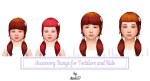
Baby Bangs & Straight Bangs for Kids & Toddlers:

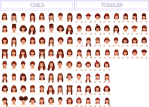
@coolalas requested to enable the bangs for toddlers and kids, and I spent my morning doing that. I included pictures of all the hairstyles that I currently have in game that work with the bangs.

I only made the baby bangs and the straight bangs because I feel like those are the ones that look the cutest for children. I hope you guys enjoy these! 

°˖✧◝(⁰▿⁰)◜✧˖°

About these bangs:

  • found in hat category
  • toddler – kid
  • non-textured; will take the texture of the hairstyle used
  • work better with straight hairstyles
  • mix & match to create interesting new hairstyles!
  • not hat compatible
  • also compatible with alpha hairstyles
  • custom thumbnails

Disclaimer:

  • These bangs will NOT work for every single hairstyle
  • With darker hairstyles, some of the clipping is not noticeable
  • They work better with hairstyles that don’t already have bangs
  • There may be clipping
  • Don’t work for very short hairstyles
  • The straight bangs work for a greater number of hairstyles

Download (SFS)    –   Â đŸ‘¶ Bangs for Toddlers

Download (SFS)    –   Â đŸ‘¶ Bangs for Kids 

Download (SFS)    –    Straight Bangs for Toddlers

Download (SFS)    –    Straight Bangs for Kids  

Let me know if there’s any issues.

Check out my other Accessory Bangs HERE

Your accessory bangs are SO useful, I’ve been wanting something like them forever! Thanks for sharing them :D Would you consider making some for kids and/or toddlers? :’) —

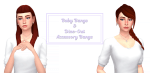
Baby Bangs & Dine-Out Bangs as Accessories:

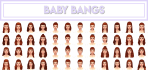
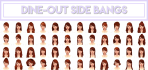
I never thught so many of you would find accessory bangs useful. I plan on making more, let’s see how it goes. For now, some of you requested to make the baby bangs that come in the Vampire Pack as accessory bangs, and here they are. I decided to throw in these side bangs too, I always thought they were super cute, but man did they give me a hard time. 

 Basically, these are bangs that you can mix and match with hairstyles. I included as many pictures as I could of the bangs with different hairstyles so you can 👀 how they look. 

 About these bangs: 

  •  found in hat category 
  • teen to elder 
  • non-textured; will take the texture of the hairstyle used 
  • work better with straight hairstyles 
  • mix & match to create interesting new hairstyles! 
  • not hat compatible 
  • custom thumbnails 

Disclaimer: 

  •  These bangs will NOT work for every single hairstyle 
  •  With darker hairstyles, some of the clipping is not noticeable 
  •  They work better with hairstyles that don’t already have bangs 
  • There may be clipping 
  • Don’t work for very short hairstyles 
  • The baby bangs work for a greater number of hairstyles 

Download (SFS) – Baby Bangs 

Download (SFS) – Dineout Side Bangs 

 Let me know if there’s any issues. 

Oh, and I updated the previous bangs to be categorized as rings instead of bracelets because apparently they would hide with long sleeves and certain outfits.

Check out my other Accessory Bangs HERE

— 13 April, 2018
How do your poses look so… anatomical? Mine always turn out having twisted arms when I’m just trying to lift the arm up in the air halp ;-; And what method do you use? The rotation tool? Or do you just press R? I’m sorry for bothering I’m trying to make poses —

How do your poses look so… anatomical? Mine always turn out having twisted arms when I’m just trying to lift the arm up in the air halp ;-; And what method do you use? The rotation tool? Or do you just press R? I’m sorry for bothering I’m trying to make poses

Hmm, it takes a while to get used to the rig system. I use both the R and the 2xR. It depends on different situations and what effect I want. 

A big thing to have in mind is the point of view where you’re working with the pose. Depending on where you’re looking at the rig, the R can do one thing, or it can do a completely different thing. For example, when I want to bring the arms down I press 1 to look at the rig from the front view, then press the shoulder joint and R to bring it down. If I were to do this on the side point of view (by pressing 3) then pressing R would not bring the arms down, but forward or backwards instead. SO I would have to use 2xR. 

Also, 2xR I use more to fix and make things look more natural, but with caution, because too much rotation makes the rig look twisted, in those cases, if I can’t find another way to move the rig so that it doesn’t look twisted, what I do is I use G, but agan, with a lot of caution, because this one can really mess up the rig. 

And I guess, to make it look more natural I try to look at references when making poses. Now that I’ve gotten used to it I can kind of see things better in my mind, but at the beginning I had to use references that showed every single thing for the pose, like if there was a hidden arm because of the angle of the picture, I would freak out. Or I also try making the pose myself. That usually helps for a quick checkup.

Edit: for lifting up the arms and not having them look super twisted, you should try rotating the shoulders AND the joints right under the neck, I think they’re the collarbone one? Tweak both these joints until you get something that looks acceptable. It’s a messy process.
Design a site like this with WordPress.com
Get started